
Nivona error codes: causes and fixes
Author: AMT SerwisUpdated:
A sudden fault or an error on your Nivona machine's display can ruin your mood and take all the pleasure out of making coffee. What should you do, and does every fault call for a service visit? Which Nivona problems can you fix at home?
How to prevent coffee machine faults
Nivona machines enjoy a good reputation among coffee lovers. What speaks for the brand is its modern, elegant look, its intuitive and simple menu, and – perhaps most importantly – the excellent taste of the coffee. An automatic Nivona machine is a solid, easy-to-use appliance that works well both at home and in the office. At the same time, like any appliance, it can develop a fault. Machines that are not cleaned and maintained consistently are especially at risk. So if you own an automatic machine and want it to serve you well for a long time, remember that every coffee machine needs regular descaling and cleaning. Most of that you can do at home. What matters is doing it regularly and with the right products and accessories – ideally the ones the manufacturer recommends. You can also have the maintenance done professionally at a repair workshop, where your appliance will not only be descaled and degreased but also given a full technical inspection.
Nivona error 5
If your Nivona machine displays error code 5, there is a problem with the temperature sensor (the NTC sensor). You may already have noticed that the machine was not heating up enough, that the coffee was not hot enough and had an unpleasant metallic aftertaste. If that had made you suspect the machine was not working properly, error 5 confirms it: the problem is a failure to reach the right temperature. This fault affects not only the quality of the coffee but can make brewing impossible altogether. To start with, you can check whether a blown thermal fuse is to blame. Bear in mind, though, that a blown thermal fuse may itself be the consequence of another fault, in which case replacing it will not solve the problem for long. If the NTC sensor itself is damaged, it has to be replaced. That kind of repair calls for the right knowledge and experience, so the best route here is a professional workshop specialising in coffee machine repairs.
Nivona error 8
If error 8 appears on the display, the problem concerns the brew unit – more precisely, it is incorrectly positioned. This usually happens as a result of neglect on the user's part. Error 8 most often shows up in Nivona machines that are not cleaned consistently, so coffee residue works its way into the brew unit and can jam it. In that case you should take the brew unit out and clean it, following the manufacturer's instructions in the manual. If the problem persists, you can suspect that the drive mechanism has seized. That is rare, but it does happen – and diagnosing and repairing it yourself will be difficult. Here you are best off relying on a professional workshop, which will inspect the machine and assess its technical condition under workshop conditions.
Nivona error 9
A Nivona fault that produces error 9 means the ceramic multi-valve has failed. Unfortunately that means you will not be making coffee until the machine reaches the hands of professionals. Repairing the ceramic valve in a Nivona machine means replacing it – that is the only solution for error code 9. Sadly it is one of the more expensive parts, and fitting it takes a good deal of time and even more knowledge if the repair is to be effective. Based on our experience, we advise against attempting this repair yourself.
The "empty the trays" message on a Nivona machine
When the message to empty the trays appears while they really are full, there is nothing odd about it – it is exactly what stops the trays overflowing and the grounds container filling up. What is rather more surprising is the same message appearing when you have only just emptied them. In that case, pull the drip tray out of the machine and look at the back of it. You will find two metal contacts there, which are indirectly responsible for the message. Check that they are dry and clean; if not, clean and dry them. Do the same with the pair of contacts on the machine's housing – the point where the tray contacts meet the housing contacts should be free of dirt. Put the tray back in. This straightforward step should stop the message appearing without reason.
The "no tray" message on a Nivona machine
If your Nivona machine displays a message saying the tray is missing even though it is in place, the contacts are again what to look at. Proceed as described above for the "empty the trays" message. Take the drip tray out of the machine. At its end you will find metal contacts, which need drying. Do the same with the second pair of contacts on the machine housing. The point is for the space between the plates – those on the tray and those on the machine – to be clean and dry. Once you have done that, put the tray back in and the message should disappear. The contacts usually get wet while the tray itself is being washed, and the water left on them triggers the false message.
The "add coffee" message
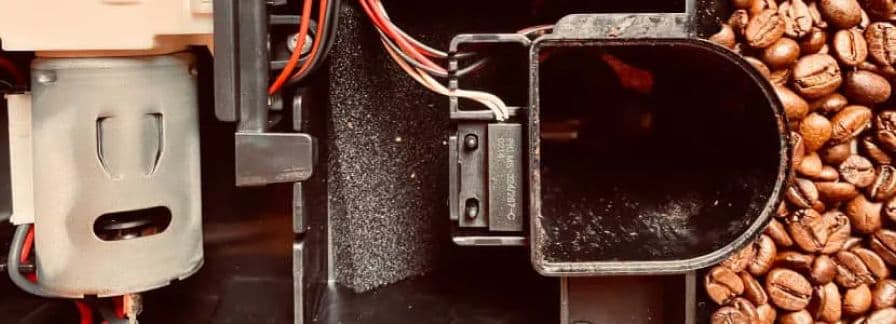
The "add coffee" message on a Nivona machine refers to the bean container. It usually means the beans have run out and the container needs refilling. A sensor is responsible for monitoring the bean level in an automatic Nivona machine – and sensors do sometimes fail. If the container is not empty and the machine still shows "add coffee", try stirring the beans first: they may have settled in a way that leaves the sensor unable to detect them. If, however, the message does not disappear, or keeps coming back despite a full container, the bean sensor may need replacing. The best solution then is a professional repair centre, which will be able to confirm or rule out the cause and carry out an effective repair. In cases like these, a new bean sensor is usually needed.